So, let’s get to OpenAI ChatGPT, as it resounds throughout the land, how big and good it is 😉 Also there might be some open-source LLMs with equal capabilities, let’s have a specific look at that LLM as it’s currently the most relevant for business applications.
For .NET applications it’s relevant, that Microsoft offers OpenAI ChatGPT through its Azure subscription. Most companies will use the Azure API wrappers for OpenAI ChatGPT usage, simply because most already are using Azure subscriptions for cloud-based services.
OpenAI recommends three NuGets from community implementations for direct access, all of them released (https://platform.openai.com/docs/libraries/community-libraries). But Microsoft – as we know them – still lags a little bit behind: the NuGet of OpenAI access via Azure is still a pre-release version, which is nevertheless used a lot.
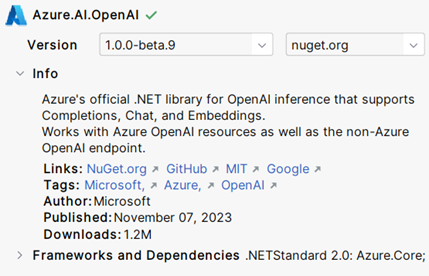
After adding the NuGet to your project as well as the .NET NuGets for Azure Core services and Azure Identity Management you are ready to start.
The following code shows how to access OpenAI and using it’s LLM model gpt-3.5-turbo-1106 for submitting an example prompt (‘What is an LLM?’). As you can see, the example uses the default Azure credential provider. Of course, this can be swapped for any other provider.
using Azure.AI.OpenAI;
using Azure.Identity;

var endpoint = "https://myaccount.openai.azure.com/";
var client = new OpenAIClient(new Uri(endpoint), new DefaultAzureCredential());

var options = new CompletionsOptions
{
    DeploymentName = " gpt-3.5-turbo-1106",
    Prompts = { "What is an LLM?" },
};
The responses from the interference can be obtained by calling GetCompletions() for the specified options.
var completions = client.GetCompletions(options);
var response = completions.Value.Choices[0].Text;
Console.WriteLine($"Response: {response}");
Without going to much into details for many applications you might also want to add the probability of your answer. Remember that the first answer we printed out above, is just the token sequence with the highest probability. It’s more correct to show the user or the consuming application also the probability of your selected response.
var prob = completions.Value.Choices[0].LogProbabilityModel;To have a minimum product for real world applications, you will also need to add context in the interference process. We can distinguish two types of contexts. The first type of context is the style how the system should generate its responses, which can be provided in the prompt itself, but also by defining a chat role for the system as in the example below. The second type of context are what OpenAI calls functions: here you can provide e. g. location data, stock market rates, or other data relevant for interference.
var chatOptions = new ChatCompletionsOptions
{
    DeploymentName = "gpt-3.5-turbo",
    Messages =
    {
        new ChatMessage(ChatRole.System, "You are an cynical assistant with bad humour."),
        new ChatMessage(ChatRole.User, "Is eating a spinach healthy?"),
    },
    // add functions to provide context
};

await foreach (var chatUpdate in client.GetChatCompletionsStreaming(chatOptions))
{
    if (chatUpdate.Role.HasValue)
    {
        Console.Write($"{chatUpdate.Role.Value.ToString().ToUpperInvariant()}: ");
    }

    if (!string.IsNullOrEmpty(chatUpdate.ContentUpdate))
    {
        Console.Write(chatUpdate.ContentUpdate);
    }
}
I didn’t add the second type in the example, as this would make the code much longer and less focussed. For the same reason, as you might have seen, I did not add failure handling etc.
Hope you enjoy trying OpenAIs ChatGPT! Personally, I think on a programmatic level, the system is pretty easy to grasp compared to the “end-user” on the prompt level. Happy coding 🚀!