Many developers with focus on Data Analytics and AI use Python as primary language. I don’t want to drift into the pros and cons of Python and as C#/.NET developers we should be able to integrate Python code seamlessly to our own applications.
Today I show you a simple example how to use IronPython NuGet as host for local Python code. With IronPython you can execute Python code and access variables and functions in Python directly. In the wild we often see solutions working on inbound and outbound streams in pipes and sockets, which generates a lot of additional code on both sides, and which also lacks a certain elegance 😉
So, let’s start with a simple piece of Python code to add numbers from an array in a loop and store the result in another variable:
example_array = [1, 2, 3, 4, 5]
example_result = 0

for number in example_array:
    example_result += number

print("Result from Py: ", example_result)
In C# access to example_array and example_result would be desireable. The print statement gives the result in the output stream, which would also be parseable and exactly this should be avoided with IronPython NuGet.
The example to execute the Python code and access the Python variables in C# looks the following:
using IronPython.Hosting;
using Microsoft.Scripting.Hosting;

var libs = new[] {@"..\PyDemo\Lib"};
var pyCode = @"..\PyDemo\PyCodeDemo.py";

ScriptEngine engine = Python.CreateEngine();
ScriptScope scope = engine.CreateScope();
engine.SetSearchPaths(libs);

engine.ExecuteFile(pyCode, scope);
dynamic exampleResult = scope.GetVariable("example_result");

Console.WriteLine($"Result in C#: {exampleResult}");
As you can see it’s very easy to set up the Python environment. Just define one or more Python package paths, the code path, then create the Python script engine and its scope, and there you go 🚀!
Note that in the example you can now directly access the value of the variable example_result from the Python scope.
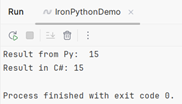
The console in C# also prints the result in the stdout stream, just to show how the combination with the result from the Python print statement looks like.
Hope this post helps Python and .NET developers to work better together. Happy coding 🚀!